TRAINER01
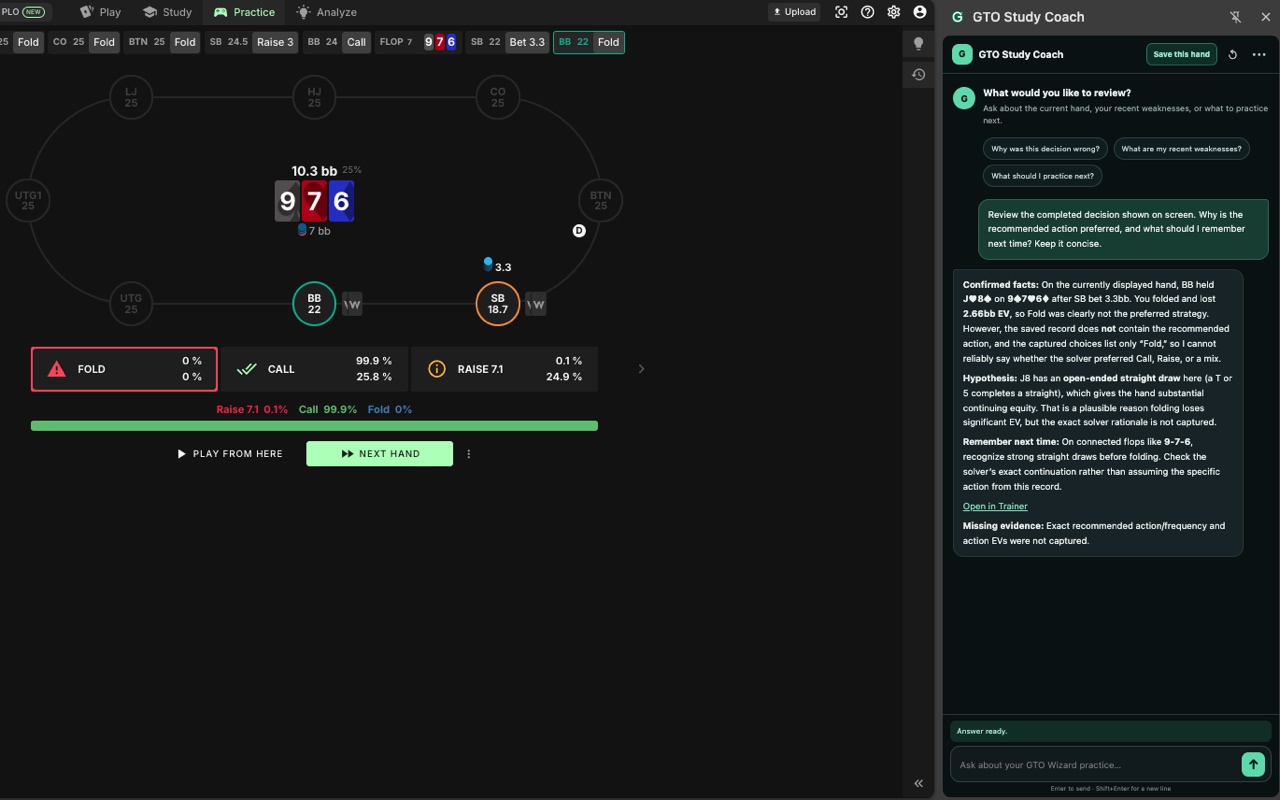
Review the spot on screen
Discuss a completed decision while the board and available results are still in front of you.
What should I notice before making this decision next time?
YOUR GTO WIZARD STUDY COMPANION
Make sense of your completed hands. Ask better questions. Find your next practice focus—all beside GTO Wizard.
Requires Chrome, access to GTO Wizard, and a signed-in ChatGPT account. Each service’s access and usage limits still apply.
LESS GUESSWORK. MORE DIRECTION.
Discuss a completed decision while the board and available results are still in front of you.
What should I notice before making this decision next time?
Review saved completed hands together. Separate a recurring mistake from a one-off result.
Which repeated mistake should I work on first, and which hands show it?
Turn completed-session summaries into one manageable study focus, a drill, and a way to check progress.
Give me a short practice plan and a clear re-evaluation criterion.
Keep GTO Wizard open and launch the extension from Chrome’s toolbar.
Save the current hand, update practiced hands, or update sessions from the panel.
Connect ChatGPT on first use, accept the data-use explanation, and send your question.
Ask for a drill focus, a sample size, and a condition for checking your progress.
YOU DECIDE WHAT HAPPENS
Refreshing saves available practice data in Chrome. It is sent to your ChatGPT conversation only when you ask a question. The extension does not read your password or sign-in cookies.
SUPPORT & GUIDES
Find setup steps, example questions, and fixes for common connection or data problems.
Built for review after practice. AI explanations can be wrong; verify exact strategies and frequencies in GTO Wizard. The extension does not provide or process real-money games, wagers, prizes, or payouts.